
On this page
- What Is Client-Server Architecture?
- What Is the Difference Between a Client and a Server?
- How Does Client-Server Architecture Work?
- Example: Opening a Product Page
- What Are the Main Components of Client-Server Architecture?
- 1. Client
- 2. Server
- 3. Network
- 4. Communication Protocol
- 5. Application Server
- 6. Database Server
- Types of Client-Server Architecture
- 1. Two-Tier Architecture
- 2. Three-Tier Architecture
- 3. N-Tier Architecture
- Two-Tier vs. Three-Tier vs. N-Tier Architecture
- Real-World Examples of Client-Server Architecture
- Web Browsing
- Online Shopping
- Email Systems
- Mobile Applications
- Online Banking
- Advantages and Disadvantages of Client-Server Architecture
- Advantages
- Disadvantages
- Client-Server vs. Peer-to-Peer Architecture
- Security and Scalability Considerations
- Security Best Practices
- Scalability Best Practices
- What Happens When a Client or Server Fails?
- Frequently Asked Questions
- What is client-server architecture in simple terms?
- How does client-server architecture work?
- What are the main components of client-server architecture?
- Is HTTP based on client-server architecture?
- What is the difference between a client and a server?
- What is the difference between two-tier and three-tier architecture?
- How does client-server architecture support multiple users?
- What are the disadvantages of client-server architecture?
- Conclusion
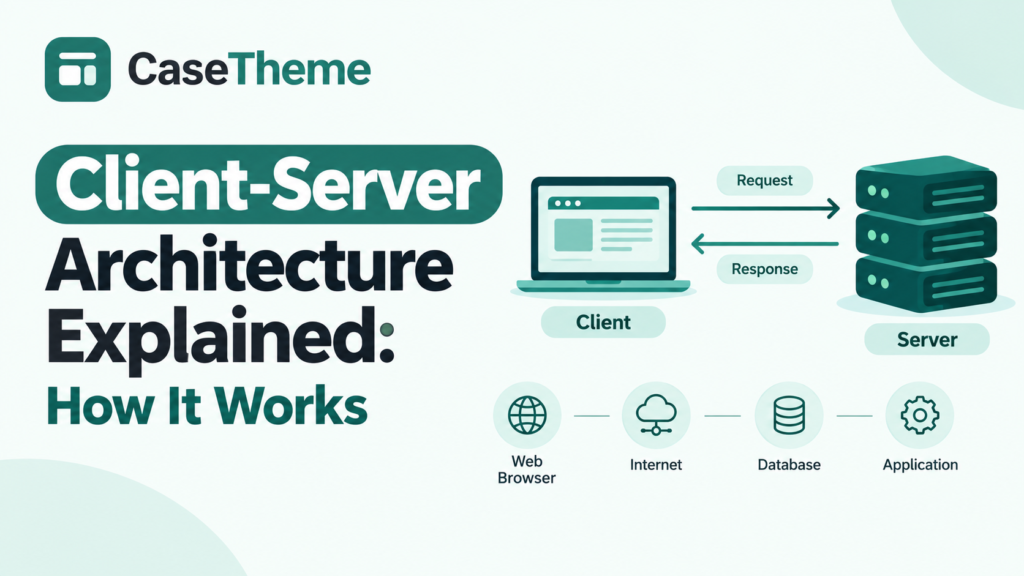
Client-server architecture is a computing model in which a client requests information or services from a server, and the server processes the request and returns a response. It is widely used in websites, mobile applications, email systems, online stores, and enterprise software.
For example, when you open an online store, your browser acts as a client. It requests product information from a server, which may retrieve the information from a database before sending it back to your browser.
Understanding client-server architecture helps developers understand how applications communicate, how data is managed, and how software systems can be designed to handle more users.
What Is Client-Server Architecture?
Client-server architecture is a network architecture that separates the consumer of a service, called the client, from the system that provides the service, called the server.
The client initiates a request, and the server receives and processes it. Depending on the application, the server may retrieve data, perform calculations, verify permissions, or communicate with other services before returning a response.
A client can be a web browser, mobile application, desktop program, or another server. A server can be a physical computer, a virtual machine, or a software process running in a cloud environment.
The key principle is the separation of responsibilities: clients request services, while servers provide them.
What Is the Difference Between a Client and a Server?
| Feature | Client | Server |
|---|---|---|
| Main role | Requests services or resources | Provides services or resources |
| Typical examples | Web browser, mobile app, desktop application | Web server, application server, database server |
| Communication | Sends requests and processes responses | Receives requests and sends responses |
| Data processing | Often handles the interface and user interactions | Often handles business logic, data access, and shared operations |
| Availability | May connect and disconnect as needed | Usually runs continuously to serve incoming requests |
These are common roles rather than rigid rules. A single system can act as a client in one interaction and a server in another.
How Does Client-Server Architecture Work?
Client-server communication typically follows a request-response pattern. The exact steps depend on the application and protocol, but a browser-based application commonly works as follows.
- The user initiates an action. The user opens a page, searches for a product, or submits a form.
- The client creates a request. The browser or application prepares a request containing the target resource and relevant information.
- The request travels across the network. Network infrastructure routes the request toward the appropriate server.
- The server processes the request. The server checks the request, applies relevant business rules, and determines what information or action is required.
- The server accesses other resources if necessary. It may retrieve records from a database, consult a cache, or call another service.
- The server returns a response. The response can contain HTML, JSON, a file, or another result, along with information such as an HTTP status code.
- The client handles the response. A browser may display a web page, update part of the interface, or show an error message.
The server does not necessarily access a database for every request. It may serve a static file directly, return cached content, or complete the operation entirely in application memory.
Example: Opening a Product Page
Imagine that you visit an online store and open a page for a pair of running shoes.
- Your browser requests the product page.
- The web server receives the request and routes it to the appropriate application logic.
- The application retrieves the product details, price, and availability from a database or cache.
- The server returns the requested information.
- Your browser displays the product page.
When you add the shoes to your cart, the application may send another request. The server must validate the submitted information and apply the appropriate business rules before confirming the operation.
This example illustrates an important distinction: displaying a product is not the same as authorizing a purchase. The server must not rely solely on values supplied by the client for sensitive operations.
What Are the Main Components of Client-Server Architecture?
A client-server system can contain several components. A small application may use only a client and a server, while a larger application may include multiple application services, databases, caches, and network intermediaries.
1. Client
The client is the component that initiates a request or consumes a service.
Examples include:
- Web browsers such as Chrome or Firefox.
- Mobile applications.
- Desktop software.
- Command-line programs.
- Automated services that call an API.
Clients commonly manage user interaction, display information, and perform some processing locally.
2. Server
The server accepts requests and provides the requested resource or service.
Depending on the design, a server may deliver files, execute application logic, validate requests, manage sessions, or coordinate access to data.
A server can run on a single computer or be distributed across multiple machines.
3. Network
The network carries communication between clients and servers. It may include local networks, routers, internet service providers, cloud networking infrastructure, and other intermediate systems.
Network latency, connection failures, and bandwidth limitations can affect how quickly a request completes.
4. Communication Protocol
A protocol defines how communicating systems exchange information.
Common examples include:
- HTTP: A protocol used for requesting and transferring web resources.
- HTTPS: HTTP protected using TLS to provide transport encryption and server authentication, with client authentication also possible in configurations that support it.
- TCP/IP: A family of networking protocols used to carry data across interconnected networks.
- WebSocket: A protocol that supports bidirectional communication over a persistent connection after an opening handshake.
The protocol depends on the application. Not every client-server system uses HTTP, and not every HTTP-based application follows the same internal design.
5. Application Server
An application server executes the logic required to provide an application’s functionality.
For example, it might calculate a shopping cart total, check whether a user can access an account, or prepare data for a mobile application.
In a small system, web-serving and application logic may run within the same software process. Larger systems may separate these responsibilities.
6. Database Server
A database server manages access to stored information when the application uses a database system.
It may store user profiles, orders, inventory, product details, and other records. The application typically enforces the rules that determine which database operations are permitted.
Separating application logic from database access can improve maintainability, but it also introduces another component that must be secured, monitored, and maintained.
Types of Client-Server Architecture
Client-server architecture is commonly described using tiers. A tier represents a logical or physical separation of responsibilities, such as presentation, application logic, and data storage.
The number of tiers describes how responsibilities are organized. It does not necessarily equal the number of computers involved.
1. Two-Tier Architecture
Two-tier architecture divides an application into two main parts: a client and a server.
In a traditional database-oriented design, the client communicates directly with a database server. The client may contain the user interface and some application logic, while the database manages persistent data.
Example: A desktop application used by employees to access a shared database on an organization’s internal network.
Advantages:
- Relatively straightforward to build and understand.
- Fewer application layers to manage.
- Can be suitable for small, controlled environments.
Limitations:
- Direct database access can make security and permission management more difficult.
- Updating client software may become complicated as the number of users grows.
- Complex business rules can become duplicated across client applications.
Two-tier designs are not inherently insecure or unsuitable for large systems. Their suitability depends on how responsibilities, access controls, deployment, and scaling are handled.
2. Three-Tier Architecture
Three-tier architecture separates an application into three logical layers:
- Presentation layer: Displays information and receives user input.
- Application layer: Processes requests and enforces business rules.
- Data layer: Stores and retrieves persistent information.
For example, an online shopping application may use a browser as its presentation layer, an application service to calculate prices and validate orders, and a database to store products and transactions.
The application layer acts as an intermediary between the client and the database. This allows the system to enforce business rules in a central location rather than relying on every client to implement them correctly.
Advantages:
- Clearer separation of responsibilities.
- Easier maintenance of centralized business logic.
- More controlled access to the database.
- Greater flexibility when scaling individual layers.
Limitations:
- More components to deploy and monitor.
- Additional communication between layers.
- More configuration and operational complexity.
Three-tier architecture is a common choice for web applications because it provides a useful balance between separation of responsibilities and implementation complexity.
3. N-Tier Architecture
N-tier architecture divides an application into multiple logical or physical layers beyond the basic two-tier or three-tier model.
A larger application might contain:
- A presentation layer.
- An API gateway or routing layer.
- Several application services.
- A caching layer.
- A database layer.
- A messaging or background-processing layer.
For example, an online marketplace may use one service for catalog searches, another for payments, and another for order processing.
N-tier architecture can support independent scaling and clearer separation of responsibilities. However, additional layers can also introduce network latency, deployment dependencies, and more complex troubleshooting.
More tiers do not automatically make a system better. Each layer should solve a real architectural problem.
Two-Tier vs. Three-Tier vs. N-Tier Architecture
| Feature | Two-tier | Three-tier | N-tier |
|---|---|---|---|
| Main structure | Client and server | Presentation, application, and data | Multiple separated layers or services |
| Typical complexity | Low to moderate | Moderate | Moderate to high |
| Business logic | May reside partly in the client or server | Concentrated in the application layer | Distributed among designated layers or services |
| Scaling flexibility | Depends on implementation | Layers can often scale independently | Individual layers or services may scale independently |
| Suitable use cases | Small internal applications | Many web and business applications | Complex platforms with distinct operational needs |
| Main trade-off | Limited separation in some designs | More components than a simple two-tier system | Greater operational and debugging complexity |
These categories describe common design patterns, not universal performance rankings.
Real-World Examples of Client-Server Architecture
Client-server architecture appears in many everyday technologies.
Web Browsing
When you visit a website, your browser requests resources from web servers. The server may return HTML, images, stylesheets, scripts, or application data.
The browser then processes those resources to display the page. Loading a complete page often involves multiple requests to one or more servers.
Online Shopping
An online store uses client-server communication to display products, check availability, manage carts, and process orders.
The server must validate important operations, such as prices, inventory, discounts, and payment status. A client-side interface can improve usability, but it should not be treated as the final authority for sensitive business rules.
Email Systems
An email application communicates with servers to retrieve messages, send email, synchronize folders, and manage account information.
Different protocols may be involved in sending and retrieving messages, depending on the service and configuration.
Mobile Applications
A mobile application may send requests to a backend service to retrieve account information, update preferences, or synchronize data.
The mobile app acts as the client, while the backend handles operations that require shared data or trusted server-side processing.
Online Banking
A banking application communicates with backend systems to display account information and submit transactions.
Because these operations involve sensitive information, systems need strong authentication, authorization, protected communication, validation, and monitoring. The precise architecture varies by institution.
Advantages and Disadvantages of Client-Server Architecture
Client-server architecture offers several practical benefits, but its effectiveness depends on how the system is designed and operated.
Advantages
1. Centralized management
Shared data and important business rules can be managed on the server side, making it easier to maintain consistent behavior across clients.
2. Controlled access to data
The server can enforce permissions and validate requests before allowing users to access resources or perform operations.
3. Easier maintenance of shared logic
When application rules are centralized, developers may be able to update the server without distributing a complete new version of every client.
4. Resource sharing
Multiple clients can use common services and shared data rather than maintaining separate copies of everything.
5. Flexible scaling
Server-side capacity can be increased, and some applications can distribute requests across multiple server instances.
Disadvantages
1. Dependence on server availability
If a required server becomes unavailable and there is no effective fallback, clients may lose access to the associated service.
2. Network latency
Requests must travel across a network. Slow connections or distant servers can increase response times.
3. Infrastructure costs
Production systems may require hosting, monitoring, backups, security controls, and ongoing operational work.
4. Server bottlenecks
A server that lacks sufficient processing capacity or handles requests inefficiently may struggle under heavy demand.
5. Security exposure
A server accessible over a network can be targeted by attackers. Weak access controls, vulnerable software, or inadequate validation can expose data or functionality.
6. Operational complexity at scale
Distributed deployments may require load balancing, observability, redundancy, deployment automation, and coordinated failure handling.
The goal is not to eliminate every disadvantage. It is to choose a design whose costs and risks are appropriate for the application’s requirements.
Client-Server vs. Peer-to-Peer Architecture
Client-server and peer-to-peer (P2P) architecture differ mainly in how responsibilities and resources are distributed.
In client-server architecture, a designated server provides a service to clients. In a peer-to-peer system, participating nodes can communicate directly and may act as both consumers and providers of resources.
| Feature | Client-server | Peer-to-peer |
|---|---|---|
| Main structure | Clients communicate with designated servers | Peers communicate with other peers |
| Resource management | Often coordinated by servers | Often distributed among peers |
| Central dependency | A central service may be a critical dependency | May avoid reliance on one central service, depending on design |
| Administration | Centralized management can be simpler | Coordination and consistency can be more complex |
| Examples | Traditional web applications, centralized email services | Some file-sharing and distributed communication systems |
P2P systems are not always fully decentralized, and client-server systems are not always hosted on a single machine. Hybrid designs are also common.
Choose the model according to the application’s needs for coordination, availability, security, performance, and operational control.
Security and Scalability Considerations
A client-server architecture must be designed to handle both legitimate traffic and unexpected conditions.
Security Best Practices
- Use HTTPS where appropriate: Protect data in transit with correctly configured TLS.
- Validate requests on the server: Treat client-supplied data as untrusted.
- Enforce authorization: Verify that the requesting user or service has permission to perform the requested action.
- Protect credentials and secrets: Avoid exposing database passwords, private keys, and service credentials in client-side code.
- Apply least privilege: Give users, applications, and services only the access they need.
- Keep software updated: Patch relevant operating systems, libraries, frameworks, and server software.
- Monitor suspicious activity: Use logs and monitoring to identify failures and unusual access patterns.
Security also depends on the application’s threat model, deployment environment, and data sensitivity. No single measure makes a system completely secure.
Scalability Best Practices
Load balancing: Distribute incoming requests across multiple server instances when the application and deployment support it.
Caching: Reuse appropriate responses or frequently accessed data to reduce repeated work. Cached information must have suitable expiration and invalidation rules.
Database optimization: Use appropriate indexes, efficient queries, connection management, and capacity planning.
Stateless application design: Where practical, avoid depending on one server instance’s local memory to preserve essential user state. This can make requests easier to distribute across multiple instances.
Monitoring and testing: Measure response times, error rates, resource usage, and database performance. Load testing can help identify bottlenecks before demand increases.
What Happens When a Client or Server Fails?
Failure behavior depends on the design.
- If a client disconnects, the server may continue processing an operation that has already started.
- If a server becomes unavailable, requests may fail or time out.
- If a database becomes unavailable, the application may be unable to complete operations that depend on it.
- If a response is lost after an operation succeeds, the client may not know whether the operation completed.
Applications should use appropriate timeouts, error handling, health checks, and recovery strategies. For operations that may be retried, idempotency and duplicate-request handling are particularly important.
Retries should be designed carefully: blindly repeating a payment or another non-idempotent operation can produce unintended results.
Frequently Asked Questions
What is client-server architecture in simple terms?
Client-server architecture is a system in which one component requests a service and another component provides it. For example, your browser requests a web page, and a web server sends the requested content back.
How does client-server architecture work?
The client sends a request through a network. The server receives and processes it, accesses other resources when necessary, and returns a response. The client then uses that response to display information or continue an operation.
What are the main components of client-server architecture?
The main components are the client, server, network, and communication protocol. Many applications also use application servers, databases, caches, and other services.
Is HTTP based on client-server architecture?
Yes. HTTP is a client-server protocol that uses requests and responses. A client sends a request for a resource, and a server returns a response. HTTP’s semantics are defined in the IETF’s RFC 9110.
What is the difference between a client and a server?
A client requests or consumes a service, while a server provides the requested service. A web browser is a common client, and a web server is a common server.
What is the difference between two-tier and three-tier architecture?
Two-tier architecture separates an application into two main parts, commonly a client and a server. Three-tier architecture separates presentation, application logic, and data management into three logical layers.
How does client-server architecture support multiple users?
A server can accept requests from multiple clients and process them using available resources. Production systems may use concurrency, connection management, load balancing, and database controls to support simultaneous users. Actual capacity depends on the implementation and infrastructure.
What are the disadvantages of client-server architecture?
Common disadvantages include dependence on server availability, network latency, infrastructure costs, potential server bottlenecks, and security risks. These challenges can be reduced through appropriate architecture, monitoring, security controls, and redundancy.
Conclusion
Client-server architecture provides a practical way to organize communication between applications and the services they use. By separating clients from server-side responsibilities, developers can manage shared data, enforce business rules, and build applications that serve multiple users.
Two-tier designs can work well for simpler systems, while three-tier and N-tier designs provide additional separation when an application requires it. The right choice depends on security, scalability, maintainability, performance, and operational complexity.
Understanding the request-response cycle and the responsibilities of each component provides a strong foundation for learning web development and designing more reliable software systems.